


Overview
TikTok’s algorithm and massive reach make it a powerful platform for ecommerce brands ready to turn engagement into conversions. A TikTok Conversion Campaign helps you drive sales directly from your videos – targeting users who are most likely to purchase based on pixel data and behavior signals.
In this guide, we’ll show you how to create, optimize, and publish a TikTok Conversion Campaign from start to finish – including catalog setup, optimization goals, audience targeting, bidding, and tracking.
Prefer the checklist version? Download the TikTok Conversion Campaign SOP PDF here
Shortcuts ✂️
- Creating a Conversion Campaign in TikTok Ads Manager
- Choosing Objective & Campaign Settings
- Catalog Setup
- Optimization & Bidding
- Budget & Schedule
- Ad Group Targeting
- Creative & Identity Setup
- UTM Tracking & Publishing
- FAQ
Step 1 – Create Campaign
In TikTok Ads Manager, click the green “+ Create” icon on the left side of your dashboard.
Select Auction as your buying type to start the campaign creation flow.
Step 2 – Choose Your Objective
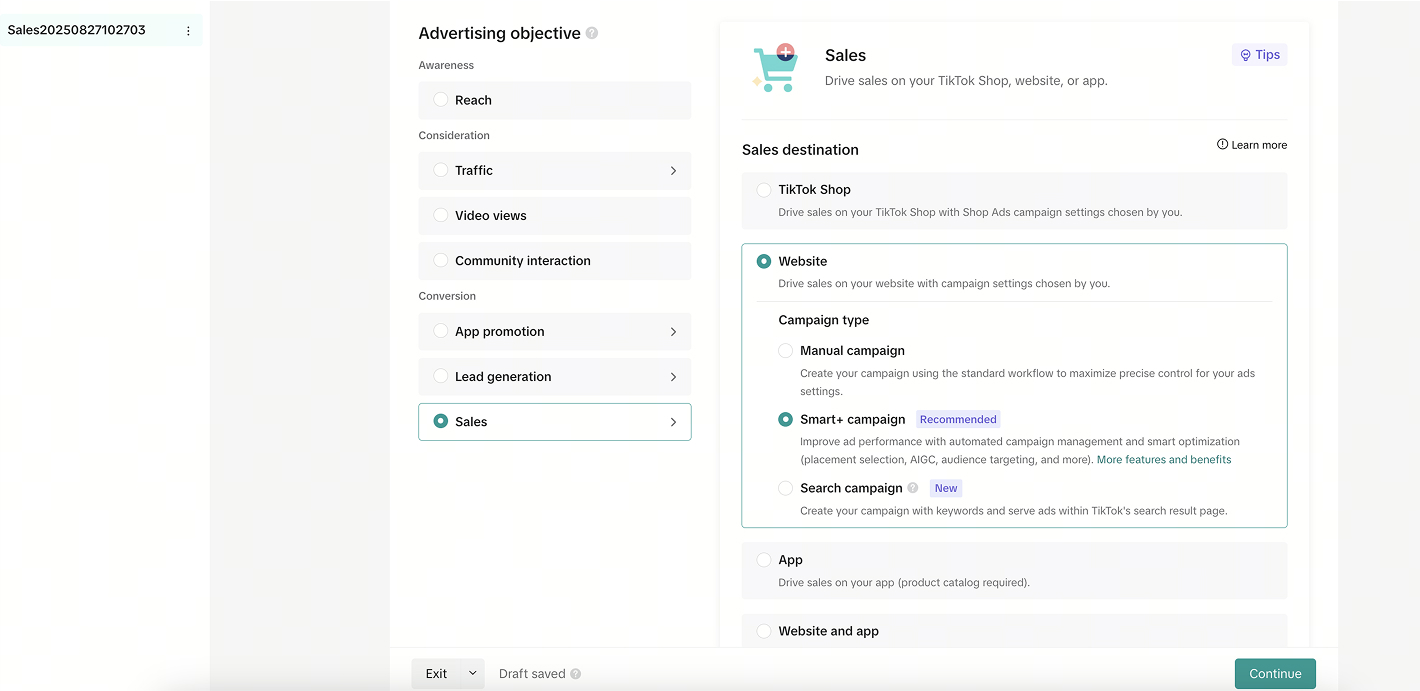
Select Sales as your campaign objective. This tells TikTok to optimize delivery for conversions rather than clicks or reach.
If you already have conversion data, use Smart Campaigns for automated optimization. If not, start with Manual Campaigns to maintain more control as the pixel learns.
Step 3 – Name Your Campaign
At the bottom of the setup screen, give your campaign a clear, structured name.
Example: 2025 – TikTok – Conversion – BrandName.
Step 4 – Catalog Setup
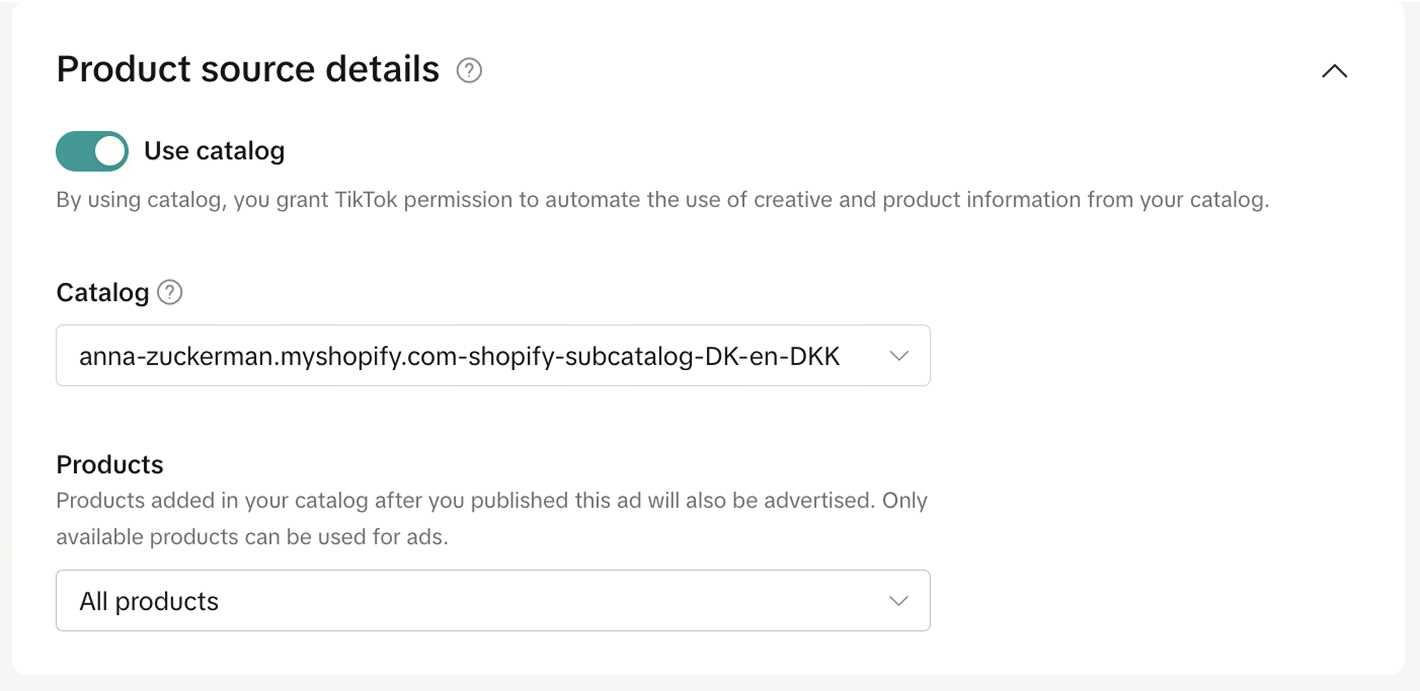
Under Catalog Setup, select the appropriate Product Catalog linked to your ecommerce store (Shopify, WooCommerce, etc.).
Next, choose the Product Group you’d like to promote within this campaign.
Step 5 – Optimization & Bidding
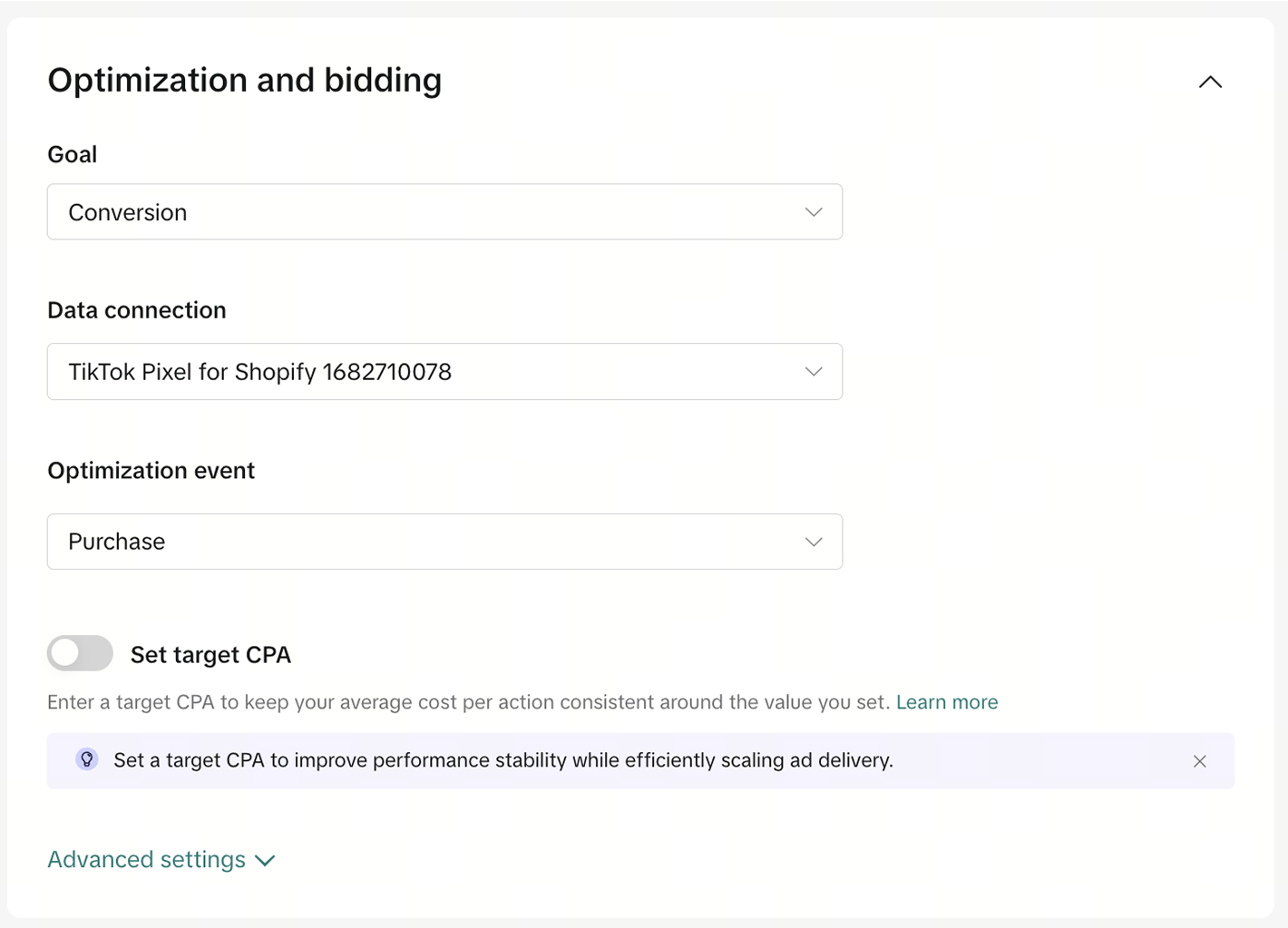
Set Conversion as your campaign goal and connect your TikTok Pixel to your Shopify or ecommerce store.
Then, set Purchase as your optimization event so TikTok’s algorithm focuses on users most likely to complete a purchase.
If your account doesn’t have enough data, skip adding a tCPA (target cost per action) at first. Let the algorithm learn before introducing cost caps.
Step 6 – Ad Group Targeting
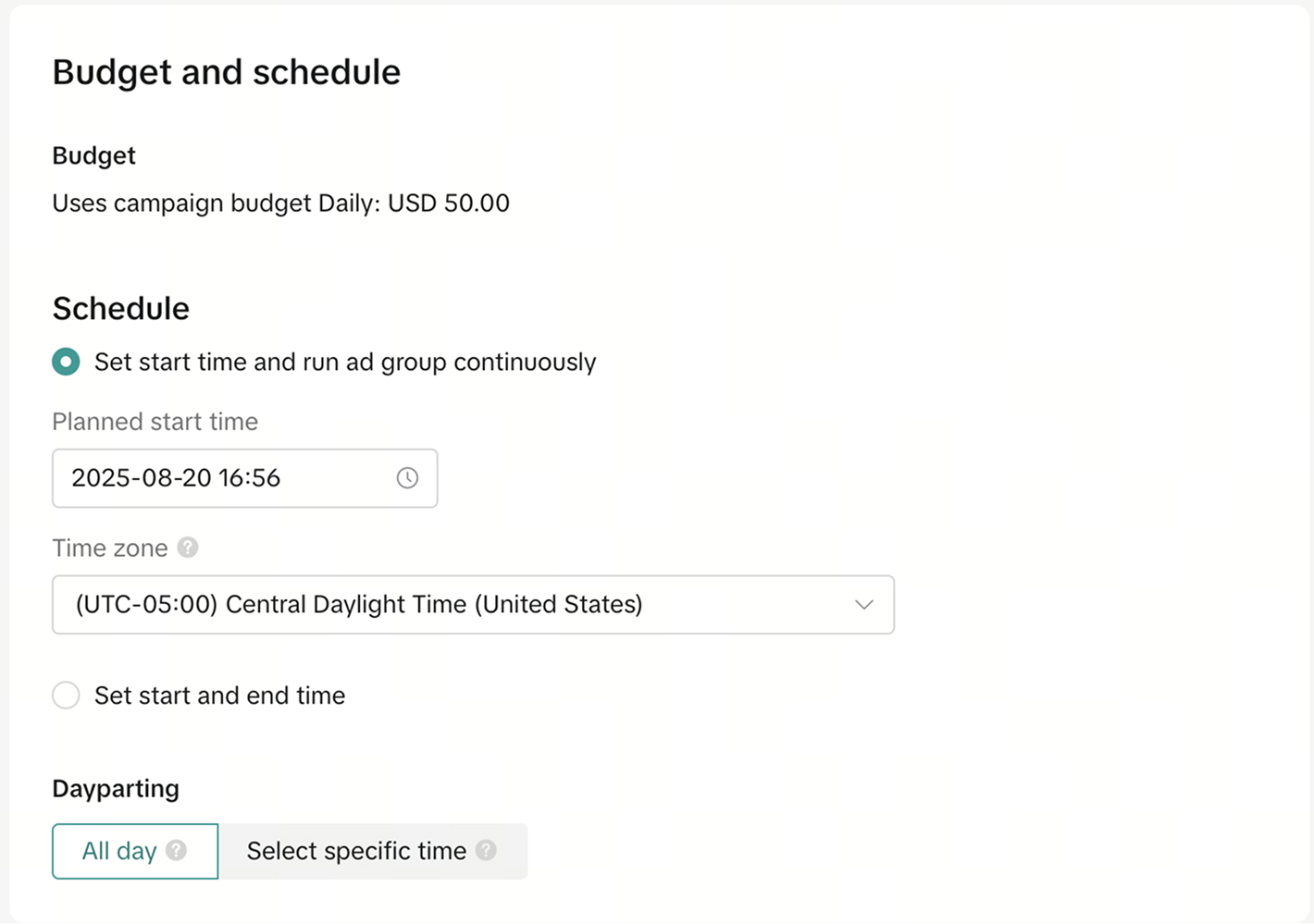
Enter your daily or lifetime budget based on your campaign goals.
You can also schedule your campaign to start or end on specific dates — ideal for limited-time sales or launches.
Step 7 – Ad Group Targeting
In the Ad Group section:
- Set Location, Language, Age, and Gender
- Add exclusions if needed (e.g., existing customers or certain demographics)
Then build your targeting layers:
- Interest Targeting: Lifestyle, luxury, home décor, fashion, travel
- Behavior Targeting: Based on recent video views or category engagement (7–15 days)
- Custom Audiences: Website visitors, customer lists, or app users
- Lookalike Audiences: Based on previous purchasers or engaged users
- Smart Targeting: Allow TikTok to broaden reach automatically
Step 8 – Ad Creation
At the Ad level:
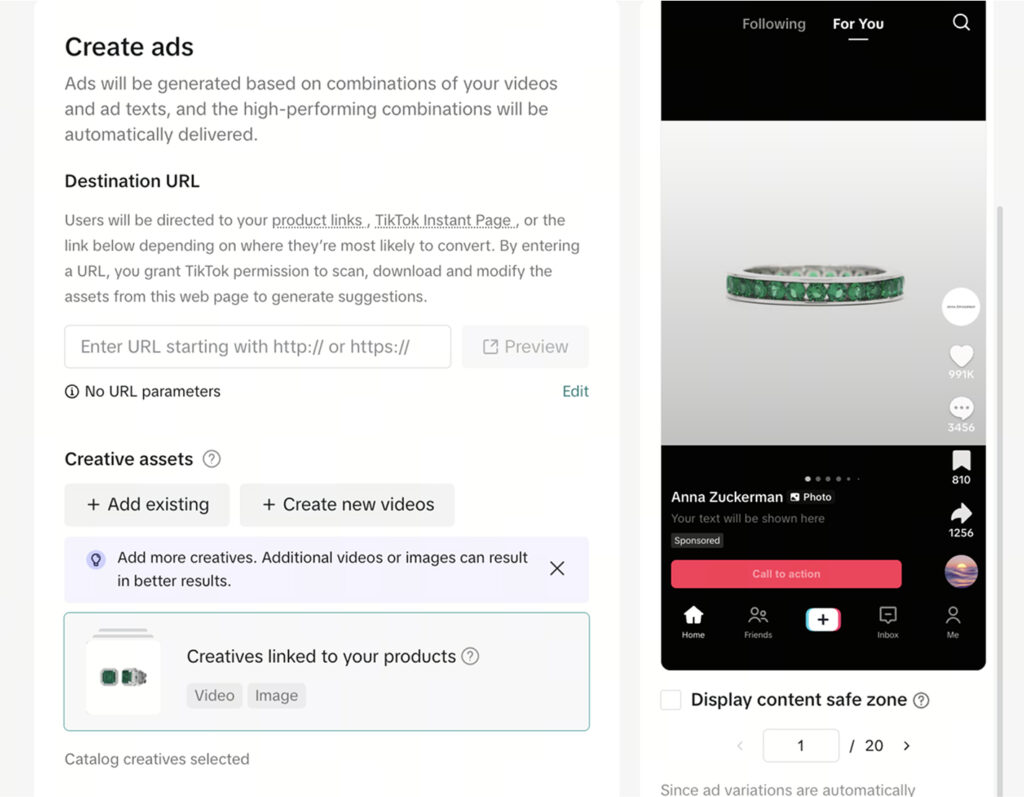
- Insert your Website URL as the destination
- Add your assets (videos or images) — you can use an existing TikTok post or upload new creatives
- Choose your TikTok account as the ad identity
Then write your ad text, ensuring it’s short, engaging, and aligned with your visuals.
Add product details from your catalog and remove background music for image-based ads to keep them clean and professional.
Step 9 – Add Disclaimer, CTA & UTM Parameters
If required, include a disclaimer (e.g., shipping details or promotional conditions).
Then select a Call-to-Action (CTA) — most conversion ads perform best with Shop Now, Buy Now, or Learn More.
Finally, add UTM parameters for tracking in GA4 or Looker Studio:
- utm_source: tiktok
- utm_medium: paid_social
- utm_campaign: conversion_campaign_2025
utm_content: ad_01a
Step 10 – Publish Campaign
Once you’ve reviewed all sections — objective, catalog, targeting, creative, and tracking — click Publish.
Monitor early results like CTR, CPA, ROAS, and Conversion Rate during the first week to assess performance and make optimizations.
FAQ
What is a TikTok Conversion Campaign?
It’s a campaign type that optimizes for actions like purchases, sign-ups, or checkouts rather than just clicks or video views.
What optimization event should I use?
Use Purchase for ecommerce or Add to Cart if you’re still building pixel data.
Do I need a TikTok Pixel?
Yes — it’s essential for tracking conversions, building audiences, and feeding TikTok’s algorithm with accurate data.
What’s a good learning phase budget?
Start with at least $50–100/day per ad group to exit the learning phase faster.
How soon can I adjust targeting or budget?
Wait at least 7 days or 50 conversions before making major changes to avoid resetting the algorithm.
Launch Your Conversion Campaign
You’ve now set up a TikTok Conversion Campaign from start to finish — complete with catalog integration, pixel setup, audience targeting, and optimized bidding. With this foundation, you can start testing creatives, measuring performance, and scaling confidently.
At NANO, we’ve helped brands grow through data-driven paid media strategies that turn browsers into buyers.